WORKSPACE GUIDE · REVIEWED 13 SEPTEMBER 2026
Connect and investigate from the workspace
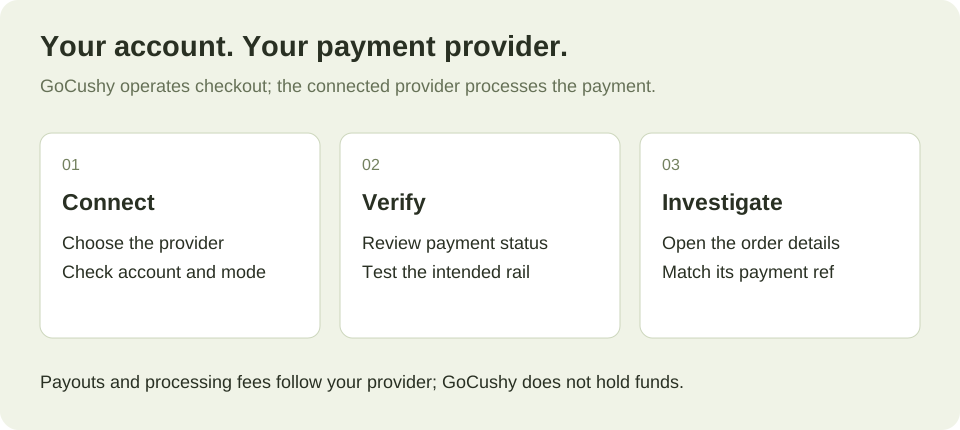
Open Connections to manage supported payment providers. Confirm the account and environment before saving credentials. In Orders, open Manage for the paid order and follow its labelled provider link. Stripe, Airwallex and PayPal payments have a direct provider link when a valid payment reference is recorded. Use the test-payment link for sandbox activity, or copy the reference and search in the account that received the payment.
01 — The shape of it
Where the money goes
Buyer → your own processor account → your bank. GoCushy sits beside that line, not on it: it instructs the charge and never holds the funds. You remain the seller of record, the customer relationship is yours, and your buyers' names and payment history live in your accounts.
The practical consequences are worth stating. Payouts run on your processor's normal schedule for your account and country — nothing new to configure and no extra holding period. Refunds come out of your balance, not ours. And if you ever leave, your customer list does not live somewhere you have to ask for it back.
Currency and region
Four different settings, one clear purchase
Your business location establishes your seller and tax context. An NZ signup starts with NZD, Pacific/Auckland time and overseas selling disabled. The global workspace uses the business settings you configure. A regional landing page does not register your business for tax.
Your product currency is chosen when the product is created. EUR, USD and NZD identify prices, not tax jurisdictions. A bundle and its extras must use compatible currencies; reports do not silently add different currencies into one total.
Your buyer’s payment currency can differ on eligible Airwallex offers. This needs a paid plan, an active Airwallex connection selected as the primary card provider, the currency-choice setting enabled and a supported currency list. Buyers choose from the menu; GoCushy does not automatically geolocate a price. Trials and cart offers do not show this menu. A buyer sees the quoted amount before authorising it.
Your settlement currency and any conversion or payout fees are controlled by your payment provider. A GoCushy order shows the purchase currency and payment record, not proof of a later bank payout.
GoCushy’s own global plans are priced in USD. The NZ offer has its own NZD pricing. Those subscription prices are separate from the currencies you use for your products. See the EU selling guide for VAT and cross-border purchases.
02 — The options
The payment rails
Card, via Stripe is the default and the most complete. It is the only rail that carries a cart, a trial, a coupon and correct tax on an upsell all at once.
PayPal runs on your own PayPal Business account. One approval covers a whole cart, which is why carts work here too.
Airwallex is the global rail, and the only one where a buyer can pay in their own currency at a live rate. See Currencies — including the settlement-currency trap, which has already cost a merchant real money.
Crypto (USDC) takes one-time payments in USD, with bumps priced into the signed amount. It does not do subscriptions or trials. USD carts are supported when the crypto rail is enabled.
03 — The honest table
What each rail supports
Pay by bank uses BlinkPay for eligible NZD one-time offers when enabled. It does not support subscriptions, carts or post-purchase upsells. Its supported refunds are full refunds with asynchronous confirmation. USDC is limited to eligible USD offers, with manual refunds.
These capabilities follow the server’s payment-rail map. A provider must also be connected, enabled and eligible for the offer:
| Capability | Card / Stripe | PayPal | Airwallex | USDC / Base | Bank / NZD |
|---|---|---|---|---|---|
| One-time products | yes | yes | yes | yes | yes |
| Order bumps | yes | yes | yes | yes | yes |
| Multi-product carts | yes | yes | no | yes | no |
| Subscriptions | yes | yes | yes | no | no |
| Free trials | yes | yes | yes | no | no |
| Coupons on one-time | yes | yes | yes | yes | yes |
| Coupons on a subscription’s first payment | yes | yes | yes | no | no |
| Coupons combined with a trial | yes | no | no | no | no |
| Buyer pays in their own currency | no | no | yes | no | no |
04 — The cost
What a sale costs
Two fees exist, and only one of them is ours.
- Your processor's fee. Stripe's, PayPal's or Airwallex's standard rate for your account and country. It comes off before the money reaches you, and we never see it.
- The GoCushy platform fee, which is 3% on the Free plan and 0% on the $99/month plan — and 0%, forever, for grandfathered founding members — enforced in one place in the code rather than promised in marketing.
05 — Getting it to your bank
Payouts
There is nothing to set up here, because there is nothing of ours in the path. Your processor pays out to your bank on its own schedule — Stripe's rolling schedule for your country, PayPal's balance, Airwallex's settlement. Change the schedule in their dashboard, not ours.
The one thing to get right is on Airwallex: enable every currency you sell in as a settlement currency, or it converts to your default and you lose the spread. See Currencies.
06 — Diagnosis
If something looks wrong
A coupon was refused on a trial. Check the rail: that combination is unsupported on PayPal.
A cart offer will not take a payment. Carts run on card, PayPal, and USDC on Base where the crypto rail is enabled for your account. Airwallex refuses them — a cart has no presentment currency, which is the only thing that rail adds.
A USD sale settled in another currency. Airwallex, and the sale currency is not enabled for settlement on your account. Their support turns it on.
The money has not arrived. Check your processor's dashboard, not ours — the payout is theirs to make and ours to never touch.
07 — Next
Where to go next
Currencies, tax and invoices, or filing it to Xero or QuickBooks.