WORKSPACE GUIDE · REVIEWED 13 SEPTEMBER 2026
Use these as starting points
Replace example prices, dates and delivery destinations with the merchant’s actual choices. Request a draft where supported, review shared products and confirm before publishing. The workspace is also available for editing, order investigation and support; prompts are an optional interface to the same records.
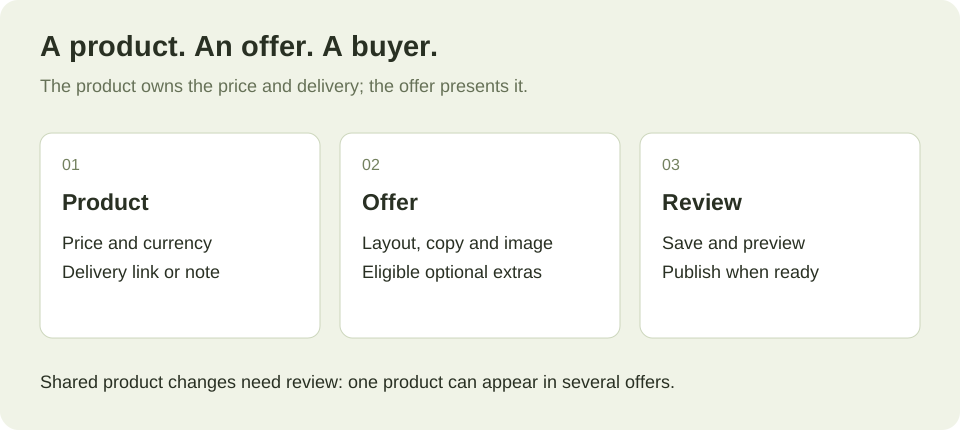
Plan the whole campaign: 30 separate guides show the audience, post, checkout and delivery flow, including TikTok, Instagram, X and Facebook examples.
NEW · 20 layout starting points
Start with something worth buying.
A useful checkout says what the product is, what it costs and what arrives after payment. These examples turn specific products into complete purchase pages. Borrow the structure, then bring your own product, photographs and brand.
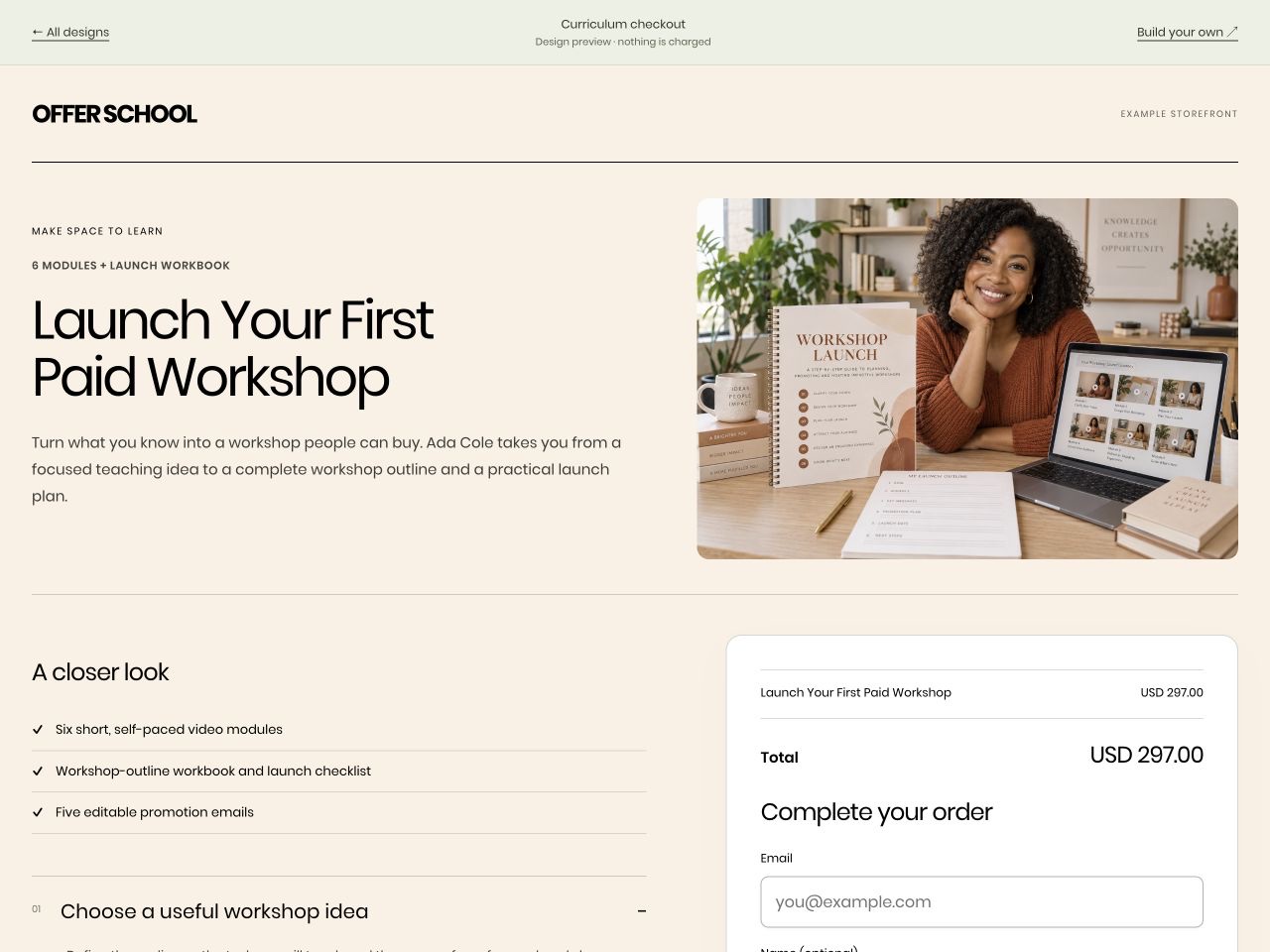 Launch Your First Paid WorkshopUS$297 · 6 modules + launch workbook
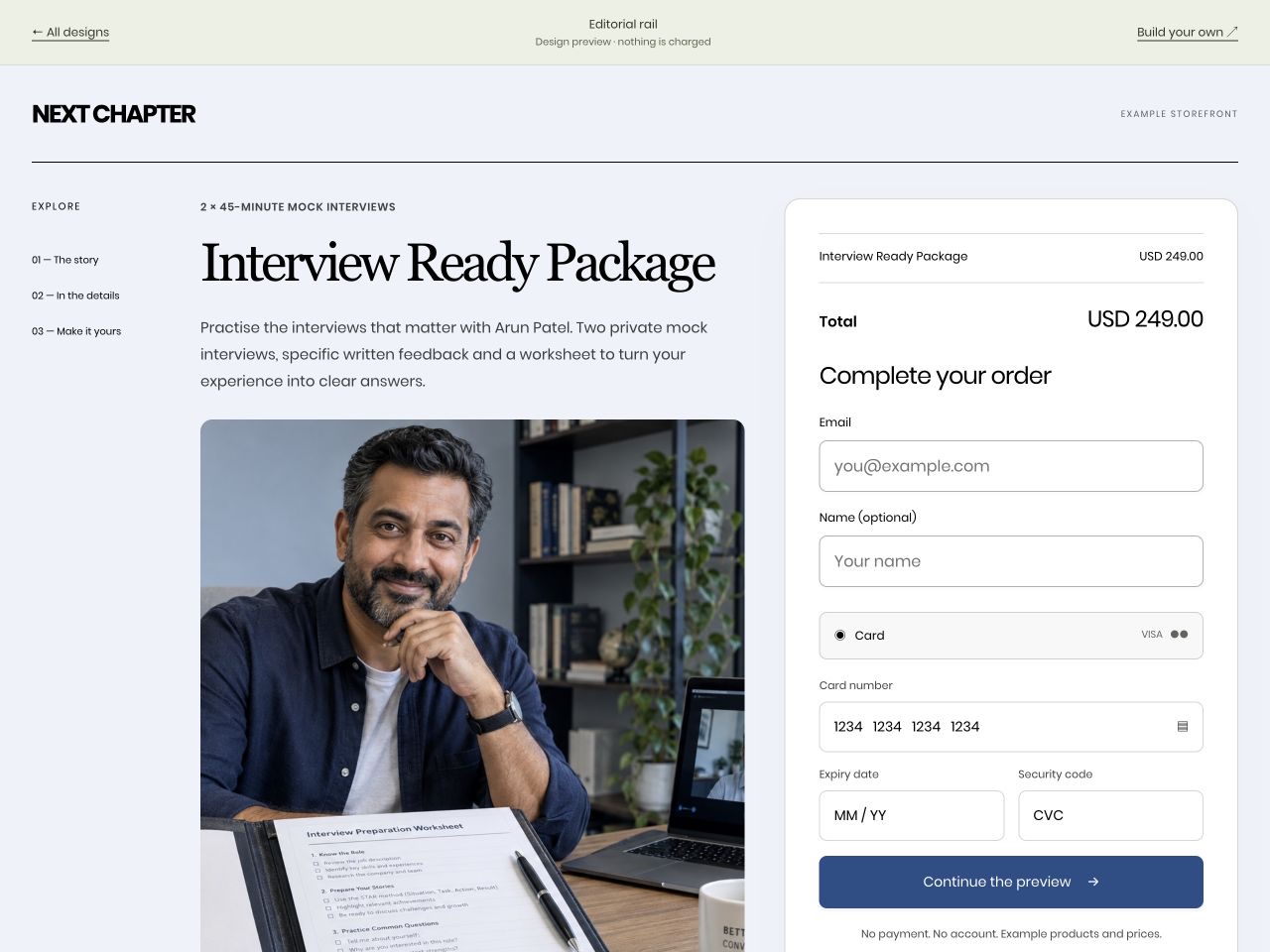 Interview Ready PackageUS$249 · 2 × 45-minute mock interviews
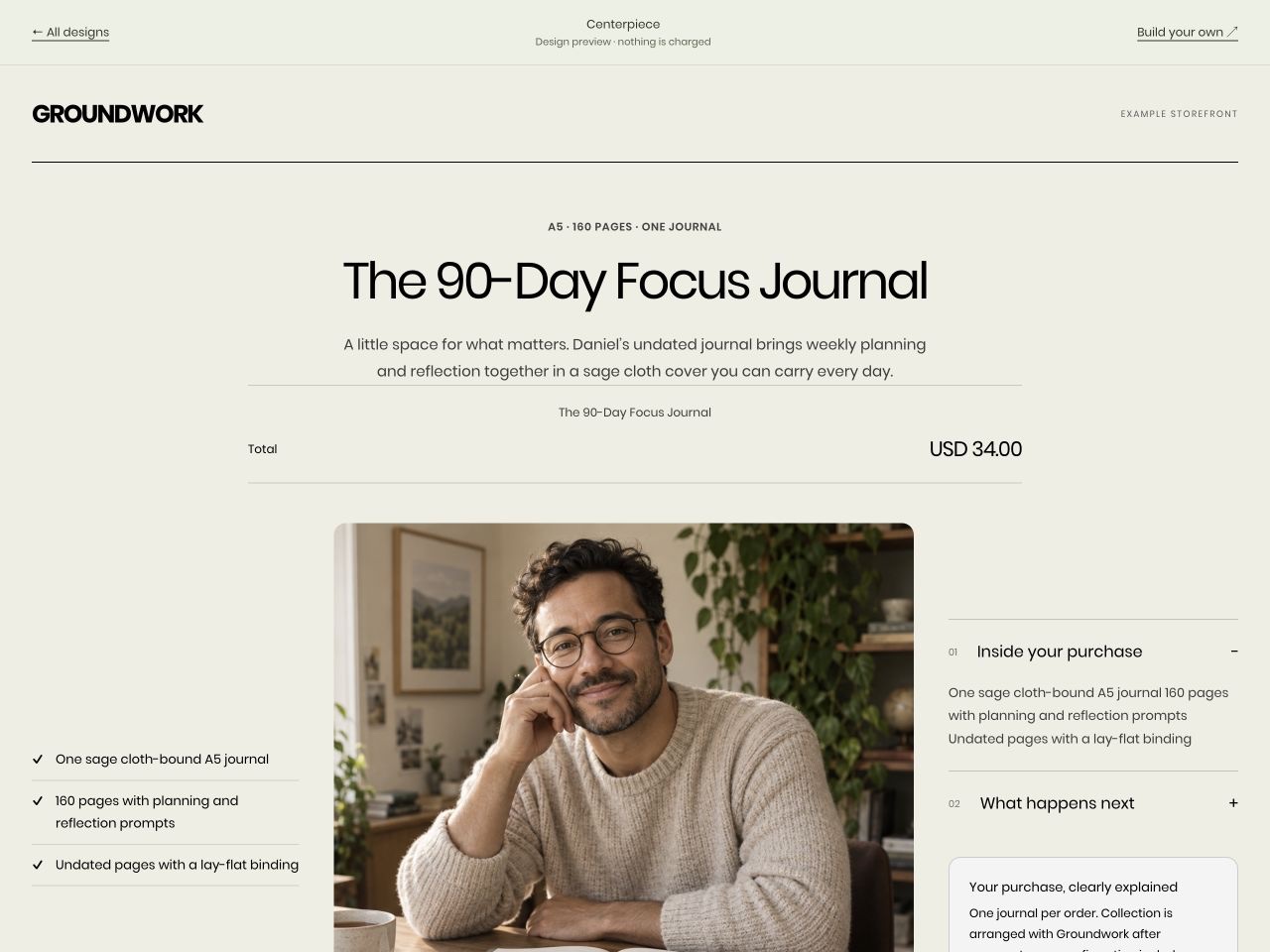 The 90-Day Focus JournalUS$34 · A5 · 160 pages · one journal
Fictional product examples for inspiration. Preview links never charge. Explore all 26 checkout examples →
Write the offer before choosing the layout
I’m selling [product name] for [price and currency]. The buyer receives [exact quantity, files, lessons or service], delivered by [actual delivery method and timing]. My audience is [audience]. Using only these facts, draft a clear checkout headline, a two-sentence description and three concrete inclusion bullets. Ask for any missing product facts. Keep this as a draft and don’t invent reviews, guarantees, deadlines or results.Choose a structure, then make it yours
Open Offers → your offer → Choose your checkout design in the workspace. Choose a design, set your accent, page and surface colours, and add your photographs. Use Preview full design to check desktop and phone, then save. Colours are independent of the layout. The preview uses your saved product prices and terms.
Copy a layout prompt below and replace the sample product with your own. Your connected AI can use the design settings its tools expose. If a setting is unavailable, ask it for the exact settings to apply in the offer editor. Selecting a design never creates the example product or copies its price into your account.
Editorial rail2 × 45-minute mock interviews
See Interview Ready Package · US$249 →
Prepare the Editorial rail design for my "Interview Ready Package" offer. Keep the two-session scope, preparation worksheet and booking process beside payment. Keep the saved product, price, currency, delivery and refund terms unchanged. Use my brand colours and approved images. Show me the proposed copy and settings before saving or publishing.Product gallery12 colours · 2 brushes · A5 paper
See Start Painting Kit · US$89 →
Prepare the Product gallery design for my "Start Painting Kit" offer. Lead with photographs of the actual palette, two brushes and A5 pad, with kit contents and collection details beside the purchase drawer. Keep the saved product, price, currency, delivery and refund terms unchanged. Use my brand colours and approved images. Show me the proposed copy and settings before saving or publishing.Guided stepsRecorded review + written action plan
See Your Offer, Reviewed · US$199 →
Prepare the Guided steps design for my "Your Offer, Reviewed" offer. Keep the review deliverables and five-business-day turnaround visible beside the details, order and payment steps. Keep the saved product, price, currency, delivery and refund terms unchanged. Use my brand colours and approved images. Show me the proposed copy and settings before saving or publishing.Side drawer6 weeks · 18 sessions
See Six-Week Dumbbell Foundations · US$79 →
Prepare the Side drawer design for my "Six-Week Dumbbell Foundations" offer. Show the six-week programme, equipment requirements and exercise demonstrations before opening the payment drawer. Keep the saved product, price, currency, delivery and refund terms unchanged. Use my brand colours and approved images. Show me the proposed copy and settings before saving or publishing.Cinema checkout8 video lessons + practice prompts
See Confident on Camera · US$149 →
Prepare the Cinema checkout design for my "Confident on Camera" offer. Use my supplied course trailer or poster above the eight-lesson outline. Only use a video URL I supply. Keep the saved product, price, currency, delivery and refund terms unchanged. Use my brand colours and approved images. Show me the proposed copy and settings before saving or publishing.Curriculum checkout6 modules + launch workbook
See Launch Your First Paid Workshop · US$297 →
Prepare the Curriculum checkout design for my "Launch Your First Paid Workshop" offer. Show the six module titles, included workbook, checklist and promotion emails beside payment. Keep the saved product, price, currency, delivery and refund terms unchanged. Use my brand colours and approved images. Show me the proposed copy and settings before saving or publishing.Plan pickerUS$29 / month · recurring access
See Focus & Follow-Through Club · US$29/month →
Prepare the Plan picker design for my "Focus & Follow-Through Club" offer. Show the monthly membership, weekly planning and coworking schedule, renewal amount and cancellation terms. Do not add subscription extras. Only compare additional saved offers if I explicitly select them. Keep the saved product, price, currency, delivery and refund terms unchanged. Use my brand colours and approved images. Show me the proposed copy and settings before saving or publishing.Bundle builder3 optional resources · choose your files
See Workshop Launch Toolkit · US$68 →
Prepare the Bundle builder design for my "Workshop Launch Toolkit" offer. Use my existing cart with the outline workbook, promotion emails and planning sheets. Each item is optional and the selected products determine the total. Keep the saved product, price, currency, delivery and refund terms unchanged. Use my brand colours and approved images. Show me the proposed copy and settings before saving or publishing.Full-bleed canvas8 painting lessons + reference sheets
See Weekend Watercolour · US$97 →
Prepare the Full-bleed canvas design for my "Weekend Watercolour" offer. Use the teacher and painting photograph as a full-width background, with a readable floating payment card and clear statement that art supplies are separate. Keep the saved product, price, currency, delivery and refund terms unchanged. Use my brand colours and approved images. Show me the proposed copy and settings before saving or publishing.Inline offer accordion1 focused class + worked examples
See Story Selling: The Hook · US$29 →
Prepare the Inline offer accordion design for my "Story Selling: The Hook" offer. Present my selected existing mini-class offers as expandable rows. Each class has its own saved price, inclusions and checkout. Keep the saved product, price, currency, delivery and refund terms unchanged. Use my brand colours and approved images. Show me the proposed copy and settings before saving or publishing.CenterpieceA5 · 160 pages · one journal
See The 90-Day Focus Journal · US$34 →
Prepare the Centerpiece design for my "The 90-Day Focus Journal" offer. Show the journal cover and interior pages in the centre, with its A5 size, 160 pages and collection details around the photograph. Keep the saved product, price, currency, delivery and refund terms unchanged. Use my brand colours and approved images. Show me the proposed copy and settings before saving or publishing.Ticket90-minute live workshop · 1 seat
See Plan a Month of Content · US$49 →
Prepare the Ticket design for my "Plan a Month of Content" offer. Use a ticket composition with the real date, time, timezone, 90-minute duration, one-person admission and replay terms. Keep the saved product, price, currency, delivery and refund terms unchanged. Use my brand colours and approved images. Show me the proposed copy and settings before saving or publishing.Chapter bands4 lessons · ages 3–6
See Calmer Bedtime Routines · US$59 →
Prepare the Chapter bands design for my "Calmer Bedtime Routines" offer. Use four horizontal lesson chapters, with the intended parent audience, printable routine cards and planning worksheet clearly included. Keep the saved product, price, currency, delivery and refund terms unchanged. Use my brand colours and approved images. Show me the proposed copy and settings before saving or publishing.One question at a time1 × 60-minute mock interview
See Interview Practice Session · US$129 →
Prepare the One question at a time design for my "Interview Practice Session" offer. Keep the one-hour session scope, written notes and booking process visible through each contact and payment step. Keep the saved product, price, currency, delivery and refund terms unchanged. Use my brand colours and approved images. Show me the proposed copy and settings before saving or publishing.Express first50 prompts + 10 worked examples
See The Caption Starter Pack · US$19 →
Prepare the Express first design for my "The Caption Starter Pack" offer. Keep the PDF, 50 prompts and ten examples clear. Show connected express methods first, with the available card option below. Keep the saved product, price, currency, delivery and refund terms unchanged. Use my brand colours and approved images. Show me the proposed copy and settings before saving or publishing.Magazine spread40 recipes + 4 seasonal menus
See The Seasonal Table · US$39 →
Prepare the Magazine spread design for my "The Seasonal Table" offer. Show a readable recipe spread, the 40-recipe cookbook and four menus, followed by a full-width purchase section. State that this is a digital download. Keep the saved product, price, currency, delivery and refund terms unchanged. Use my brand colours and approved images. Show me the proposed copy and settings before saving or publishing.Comparison checkoutEditable planner + quick-start guide
See The Content Planning System · US$49 →
Prepare the Comparison checkout design for my "The Content Planning System" offer. Compare my selected saved Standard and Complete offers using their real prices and inclusions. Never generate a new tier or price from the design. Keep the saved product, price, currency, delivery and refund terms unchanged. Use my brand colours and approved images. Show me the proposed copy and settings before saving or publishing.Expandable purchase dock3 resistance bands + reference cards
See Home Strength Companion Kit · US$59 →
Prepare the Expandable purchase dock design for my "Home Strength Companion Kit" offer. Keep the three-band kit and printed reference cards visible above the persistent purchase dock; explain collection and that coaching is separate. Keep the saved product, price, currency, delivery and refund terms unchanged. Use my brand colours and approved images. Show me the proposed copy and settings before saving or publishing.Three-panel checkout90-minute class + 5 assignments
See Your First Photo Walk · US$49 →
Prepare the Three-panel checkout design for my "Your First Photo Walk" offer. Separate contact details, payment and the 90-minute photography class summary into three columns on desktop, with a clear mobile order. Keep the saved product, price, currency, delivery and refund terms unchanged. Use my brand colours and approved images. Show me the proposed copy and settings before saving or publishing.Modular mosaic30 printed cards + parent guide
See Family Routine Card Set · US$29 →
Prepare the Modular mosaic design for my "Family Routine Card Set" offer. Use tiles for the creator, the 30 printed cards, the parent guide, collection details, price and payment. Keep the saved product, price, currency, delivery and refund terms unchanged. Use my brand colours and approved images. Show me the proposed copy and settings before saving or publishing.Bring your own brand
For my [offer name], keep the selected layout. Use accent [#HEX], page background [#HEX] and card surface [#HEX]. Use my logo [HTTPS URL], main product image [HTTPS URL] and gallery images [up to five HTTPS URLs]. Keep the product name, price and payment details easy to read. Give me the settings to review in the offer editor.Check the purchase experience
Review my [offer name] checkout on desktop and phone. Can a buyer identify the exact product, quantity or format, full price, any recurring terms, optional extras and delivery method? Check that the selected products and total stay clear through every step or drawer. Flag missing facts and propose corrections without changing my prices or terms.01 — Products
Products
A product is a single thing you sell, at a price, on your own Stripe. Create these first — offers, bumps and upsells all point at products.
Create a one-time product called "My Course" for $49 USD.Create a product "Coaching Call" for $197 USD, one-time.Create a $17 product called "Templates Pack" I can use as an order bump.Change the price of my "My Course" product to $59.Import my existing products from Stripe so I don't have to re-create them.List all my products with their prices.02 — Offers & links
Offers & checkout links
An offer is the checkout page a buyer lands on. It wraps a product (plus any bump/upsell) and gives you a shareable link.
Create an offer for my "My Course" product and give me the checkout link.Create an offer called "Summer Launch" for my "My Course" product with the slug "summer".status on an offer update if you are building against it directly.)Give me the checkout link and the short cushy link for my "summer" offer.What offers do I have live right now?TRACE — know which traffic pays
Tracking: which ad, email or post actually made money
gocushy records the ad click behind every order, so you can see what each source really produced — including the upsells and rebills an ad pixel never sees. Two things make it work, and your AI can do both.
Before you share a link anywhere. Meta and Google tag their own clicks. Nothing else does — an email, a post, a video description, an affiliate share arrives untagged and is reported as “direct” forever. It cannot be fixed afterwards, because the click was never recorded. So ask for a short tagged link instead of copying the plain one:
I'm about to email my list about the founding offer. Give me a short tracked link for it.Make me tracked links for the community post, the YouTube description and the podcast — same campaign, so they group together.Show me my campaign links and which ones people are actually clicking.Then ask what worked. Answers come back in LTV — what the customer is worth including every rebill — not just the first sale:
Which traffic made me the most money this month, counting rebills?Break my last 90 days down by campaign. Which should I put more money into, and which should I stop?Which source brings buyers who refund?Log my Meta spend for last month so I can see real ROAS.Feed the numbers back to Meta. Your pixel loses roughly a third of purchases to adblockers, so Meta optimises on a shrunken version of your results. Sending purchases from our server fixes that:
Help me set up server-side conversions to Meta, one step at a time.You'll need your dataset ID and a Conversions API token from Meta Events Manager — your AI will tell you where to find them. gocushy has no standing access to your ad account: it connects to none by default, and the only Meta access it ever gets is what you hand it yourself. Importing ad spend for ROAS is a separate, optional step where you connect your own ad account with your own token.
03 — Delivery
Delivery: get buyers what they paid for
This is the part that matters most after the sale. Give each product a delivery link (a course login, a file, a Calendly, a members area) and GoCushy shows it on the thank-you page and the receipt automatically.
Set the delivery link for my "My Course" product to https://members.example.com/courseAdd a delivery note to "My Course": "Log in with the email you bought with — access is instant."For my "Templates Pack" product, deliver this download: https://example.com/files/templates.zipMy "Coaching Call" is a service — set its delivery link to my Calendly: https://calendly.com/me/coachingCheck which of my products don't have a delivery link set yet.04 — Order bumps
Order bumps
A checkbox add-on on the checkout page — one tick, no re-entry. A long-standing direct-response way to raise the value of a sale you have already won. One-time offers only.
Add an order bump to my "summer" offer: my "Templates Pack" product.Set the bump headline on my "summer" offer to "Add the Templates Pack for $17 — most buyers do."Remove the order bump from my "summer" offer.05 — Upsells
One-click upsells
A post-purchase offer charged to the card they just used — no re-typing. Shown right after the main purchase.
Add a one-click upsell to my "summer" offer — my "Coaching Call" product.Set the upsell headline to "Add a 1:1 coaching call for $197 — one click, same card."Write the upsell body copy for my "Coaching Call" upsell — two short paragraphs.Remove the upsell from my "summer" offer.06 — Checkout design
Make the offer clear
Customise your words and brand while the saved products remain the source of prices and terms. For the 20 new structures, use the layout prompts above. Standard, Compact and Hero remain available as classic layouts.
Draft a headline and description for my [offer name] using its saved product details. Lead with what the buyer receives and keep every claim specific.Add these verified inclusions to my [offer name] checkout: [exact inclusion 1], [exact inclusion 2], [exact inclusion 3].Use this customer-approved testimonial exactly as provided: [quote], [customer name], [approved attribution]. Do not invent or embellish it.Display my actual refund policy on [offer name]: [policy text]. Keep its eligibility, exclusions and time limits unchanged.My [offer name] genuinely closes at [date, time and timezone]. Show that fixed deadline without resetting it. Keep it as a draft for my review.Switch my [offer name] to the classic Compact layout. Clear any selected new design and preserve the existing product, copy, price and delivery settings.The classic Standard layout puts story and price beside payment; Compact uses a narrow column; Hero adds a wide image banner. Choose a new design or a classic layout in your offer’s appearance settings, preview, then save.
07 — Subscriptions
Subscriptions
Recurring products billed on your own Stripe. Renewals generate their own orders, invoices and receipts.
Create a subscription product "Membership" for $29/month.Create an annual subscription "Pro Plan" at $290/year.Make an offer for my "Membership" subscription and give me the link.Cancel the subscription for buyer jane@example.com.Show me my active subscribers and monthly recurring revenue.08 — Tax & invoices
Tax & invoices
Real tax via Stripe Tax on your registrations, plus compliant sequential invoices.
Turn on tax collection for my account.Where am I registered for tax? Add my NZ GST registration.Send the tax invoice for order #1234 to the buyer again.Give me the invoice link for my most recent order.09 — Email & CRM
Email & CRM
Connect any of 13 tools — Kit, Mailchimp, ActiveCampaign, Klaviyo, Brevo, MailerLite, GetResponse, Drip, Beehiiv, Loops, Flodesk, HubSpot, EmailOctopus — then tag and sequence buyers on every event. Tip: you can also connect a tool directly from your dashboard.
Connect my Mailchimp account to gocushy — here's my API key: (paste your key).When someone buys "My Course", tag them "course-buyer" in Kit and add them to my "onboarding" sequence.If someone starts checkout but doesn't pay, add them to my "cart-recovery" list in ActiveCampaign.When an order is refunded, remove the buyer's "course-buyer" tag.Show me my email connections and any errors.10 — Affiliates
Affiliates
Give partners a referral link, track sales server-side, hold back commissions for 30 days, and claw back on refunds.
Add an affiliate: Sam (sam@example.com) at 40% commission.Give me the referral link for my affiliate Sam for the "summer" offer.Show me each affiliate's sales and what I owe them.Mark affiliate Sam's commissions as paid.10b — Coupons
Coupons & promotions
Promo codes buyers type at checkout — percent or fixed amount off, scoped to one offer or all, capped, or expiring. Applied server-side before tax; a code can never take the charge below $0.50. On subscriptions, the discount applies to the first payment.
Create a 20% coupon called LAUNCH20, limited to 50 uses.Create a $10-off coupon EARLYBIRD for my "Course" offer, expiring Friday midnight.List my coupons and how many times each has been used.The launch is over — deactivate LAUNCH20.Turn LAUNCH20 back on.Deactivating keeps the code in your order history and can be undone — a reactivated code still honours its original expiry and redemption cap. Ending or reviving a promo needs an admin key.
11 — Reporting
Reporting & sales
Ask your numbers in plain English — no dashboard hunting.
How did I do this month? Revenue, orders, bump and upsell take rates.What were my top 5 offers by revenue in the last 90 days?Export all my orders from this month as a CSV.How many people started checkout but didn't buy this week?12 — Refunds & orders
Refunds & orders
Look up and manage individual orders. Refunds route to the original payment method.
Find the order from jane@example.com.Refund order #1234 in full.Refund just the order bump on order #1234, not the main product.Has jane@example.com bought my "My Course" offer? (verify purchase)13 — Business profile
Business profile
Your name, support email and address appear on checkouts, receipts and invoices.
Set your selling defaults once — currency, brand colour, checkout template, standard guarantee — and GoCushy applies them to every new product and checkout automatically, so your AI stops asking. (Also editable in your dashboard, in the section headed Defaults — currency, timezone & brand.)
My selling defaults: currency NZD, brand colour #f0ff08, compact checkout template, and a 30-day money-back guarantee.What are my selling defaults right now?Set my business name to "Acme Learning", support email hello@acme.com.Add my business address for invoices: 12 Queen St, Auckland, New Zealand.Show me how my business details appear on a receipt.14 — Embeds & sharing
Embeds & sharing
Put your checkout anywhere — a hosted link, a lightbox popup, or inline on your own page.
Give me the checkout link for my "summer" offer.Give me the embed code for my "summer" offer as a lightbox popup button.Give me the inline embed code so the checkout sits right on my sales page.Give me the short cushy link for my "summer" offer to use in my bio.